Ordering from a QR code
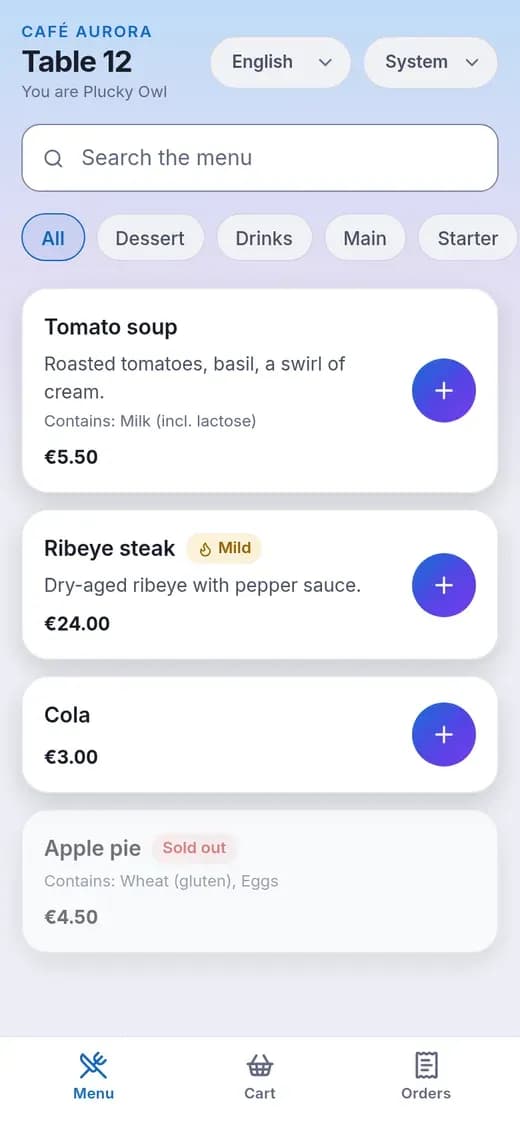
A menu with photos, allergens, spice level and tags. Guests order without an account, under an automatic nickname such as Happy Panda.
For restaurants and hotels
Guests scan a QR code at the table or in the room and order from their own phone. Orders reach your floor staff and kitchen straight away. Guests install nothing and need no account.
How it works
You set up your menu and print the QR codes. After that, ordering runs itself.
A guest scans the QR code on the table or in the room. The menu opens in the browser, in their language, with allergens, spice level and photos.
They add dishes to a cart the whole table shares and send the order. Staff confirm it before the kitchen starts, and the guest can follow its progress.
The kitchen board shows the ticket with a sound alert, and can print it. Later the guest sees a pre-bill with tax, service charge and an optional tip.
Features
Everything a venue needs to take orders from the table, and nothing to install.
A menu with photos, allergens, spice level and tags. Guests order without an account, under an automatic nickname such as Happy Panda.
Everyone at the table sees the same cart and can change it. Orders go out in rounds, and a guest can cancel until staff accept.
See every table and room, confirm incoming orders, place an order for a guest, and move a party to another table.
New, preparing and ready orders in columns, a sound alert, ticket printing on 80 mm paper, and a switch for sold-out dishes.
Per-item tax, a service charge and an optional tip. It is a pre-bill, not a tax invoice, so you keep your own certified till.
Recipes use up stock automatically, with emails for low stock and restock reminders.
Run several restaurants or hotels from one account, and copy a setup from one to another.
The interface speaks English, German, Spanish, Italian, Hindi and Arabic, including right-to-left layout. Your menu text stays in your own words.
Admin, Manager, Staff and Kitchen roles, team invitations, a log of who changed what, and a data export whenever you want it.
See it
The guest app is a web page, so it opens straight from the QR code.
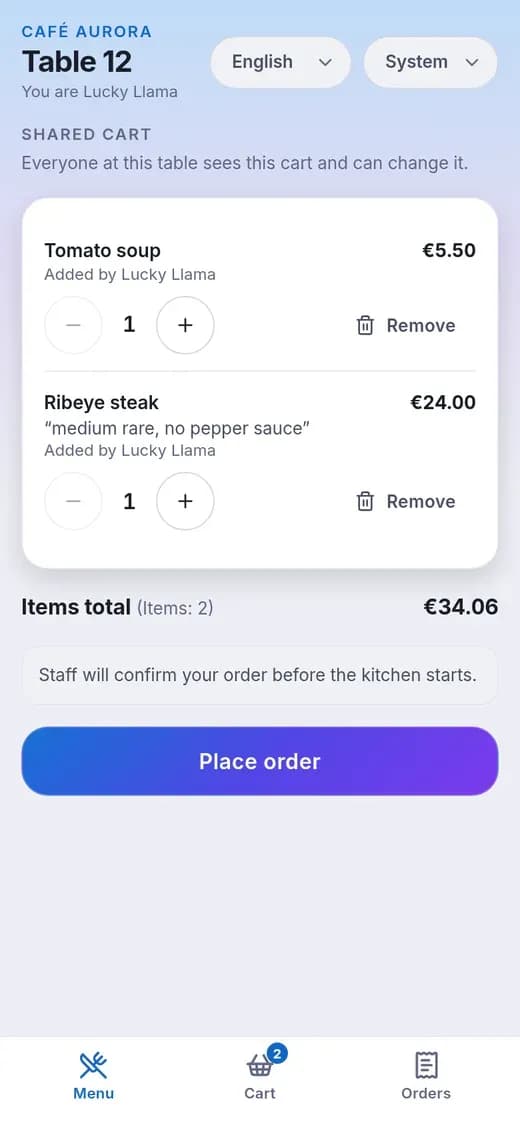
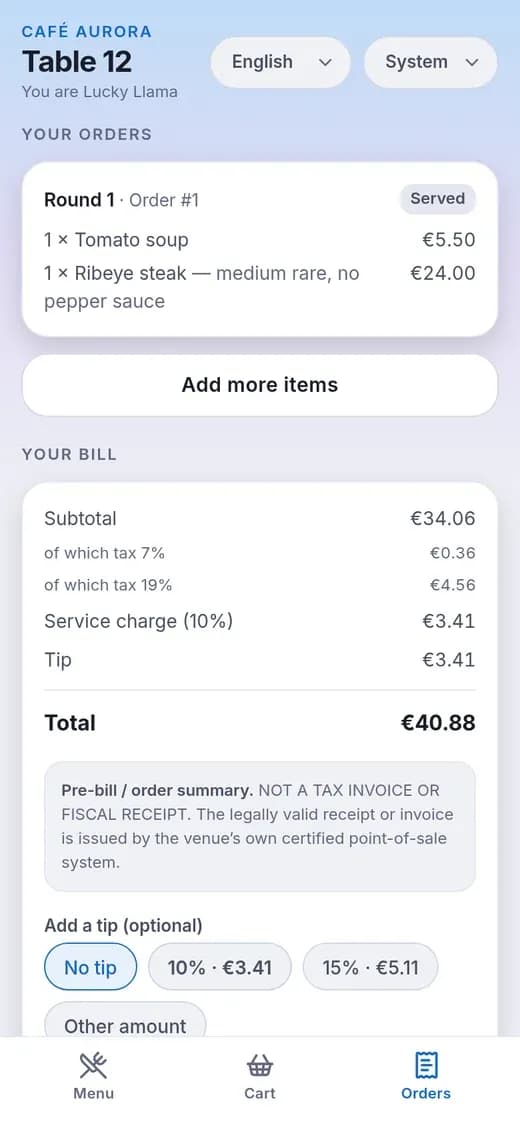
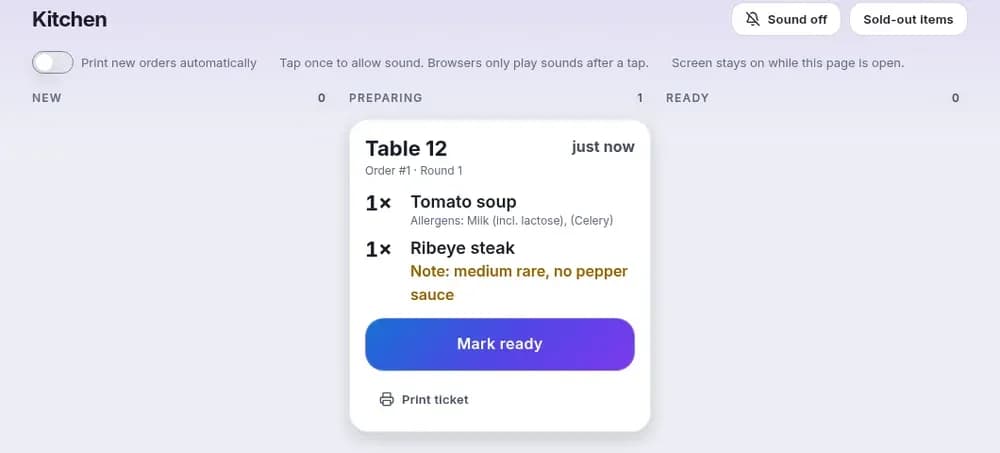
Screenshots use sample data from a demo restaurant.
Optional hardware
A small Wi-Fi display with a 2.4 inch screen sits on the table or at reception and shows a QR code that changes every minute. An old photo of the code stops working.
A changing code is a deterrent, not a guarantee. Someone could still photograph the live code and send it to a person outside the venue, who could use it until it changes.
Plans
Billed monthly. Every plan includes ordering, the staff floor view, the kitchen board and the pre-bill.
$9.99/ month
Up to 5 tables or rooms
$19.99/ month
Up to 10 tables or rooms
$29.99/ month
Unlimited tables and rooms
$99.99/ month
Everything in Large
Prices are in US dollars per month, plus taxes where they apply. Questions: support@azayn.com.
Privacy
Guests are anonymous, and the product has no analytics or ad trackers.
Guests get an automatic nickname. We do not collect a guest name, email address or phone number.
Servers and encrypted backups are at Hetzner in Germany or Finland. Each business has its own database.
No analytics, advertising or third-party trackers, and no third-party fonts. That is why there is no cookie banner.
The guest app tells guests to talk to staff about allergies. Order notes are cleared after 30 days.
Export your data at any time, delete your account yourself, and delete a business with a 14-day period to change your mind.
You enter allergens for each dish as "contains" or "may contain", never "free". The guest filter is a convenience, not a safety claim.
FAQ
Restaurants and hotels. It is a service for businesses, so consumers cannot register. Guests only scan your QR code.
No. The guest app opens in the phone browser from the QR code, and guests are given an automatic nickname.
No. It creates a pre-bill, and you settle it the way you do today. On the Large and Multi plans you can connect your own pay link or webhook. The pre-bill is not a tax invoice or fiscal receipt, so keep using your own certified till for those.
No. Allergen details are entered by the venue and can be incomplete, and the filter is only a convenience. Guests with an allergy should tell staff in person before they order.
You have a seven-day grace period in which everything keeps working. After that guest ordering is switched off, while your team can finish open orders and you keep access to billing and your data export.
Create an account at scan2eat.com, add your menu and print your QR codes. Questions before you start: support@azayn.com.

Create an account for your restaurant or hotel, add your menu and print your QR codes.
Scan2Eat is for businesses. By signing up you accept the Terms of Service and the Data Processing Agreement.